Real test prep for your whole class — teacher tools are free
Create a classroom, assign quizzes, diagnostics, section practice sets (SAT, ACT and PSAT) and full-length practice tests with due dates, and keep one roster for the whole class — the teacher tools cost nothing. Students join with free accounts and get full-length SAT, ACT, PSAT & GRE practice, with paid seats unlocking unlimited access for them.
Everything You Need to Run Your Class
What you can do in a CramClub classroom today. No add-ons and no extra cost: these are part of the free teacher account.
Closed-book exams
A private quiz you create for your class runs closed-book: while a student still has a sitting left, they see no answer key. Their answers open when the assignment closes, when they have used both sittings or you enter their grade, or if you delete the assignment or remove them from the class. SAT, ACT and PSAT section practice sets stay closed-book until the set closes or you release the answers.
Your grade is final
A grade you enter yourself is final: it ends that student’s retakes. Changed your mind? Reopen it while the assignment is open and before the student has seen the answers, and they get a sitting back.
The whole class, or chosen students
Assign to everyone, or to chosen students — and on an SAT, ACT or PSAT section practice set, the question breakdown lets you assign practice to just the students who missed a question.
Scheduled publishing and a calendar
Schedule new work to publish automatically at a time you pick, and the class is notified when it goes live. Your calendar shows upcoming due dates across your classes and flags days when the same students have two things due.
Reminders, without nagging
Students who haven’t finished are sent an email reminder in the day before a deadline. Two taps send a reminder to the students who haven’t finished — at most once a day per student, per assignment.
A class target score
Set one SAT, PSAT, ACT or GRE class target and see the scores from the diagnostics and full practice tests you assigned against it, week by week — with every student listed, including those with no score yet.
A gradebook that fills itself in
Quizzes, diagnostics, section practice sets and full-length practice tests fill the gradebook on their own. Past-due work shows as missing; excuse a student from one assignment, or count missing work as 0. Export grades as a Canvas import file, or as a CSV for any spreadsheet.
Co-teachers who say yes
Invite a co-teacher by email; nothing changes until they accept. Co-teachers assign work, read the gradebook and run live sessions — seats and billing stay with you.
Full practice tests, assigned
Pick a full-length SAT, PSAT, ACT or GRE practice test from a list — each marked “Free for every student” or “Free when assigned · Student Pro otherwise” — and assign it with a due date. Assigned work is free: every student gets one sitting of it without a seat, and it doesn’t use the full tests a free account gets a month on its own. Each student’s card says Start, Continue or Review, and the gradebook records the score.
Practice on the weakest skill
On an SAT, ACT or PSAT section practice set, the question breakdown ranks the skills (passage types, for ACT Reading and Science) the class lost the most points on. One click opens a new section practice set on that skill for the students who missed it, and before you publish the form says how many questions the set will have and whether any may be repeats.
More time for one student
Give one student their own later due date without moving the class’s. Their missing marks, late rules and reminders follow the new date.
A report for every student
Click a student’s name in the gradebook for a printable progress report: work assigned, turned in and missing, their average — the gradebook’s own numbers — and the skills where they missed questions.
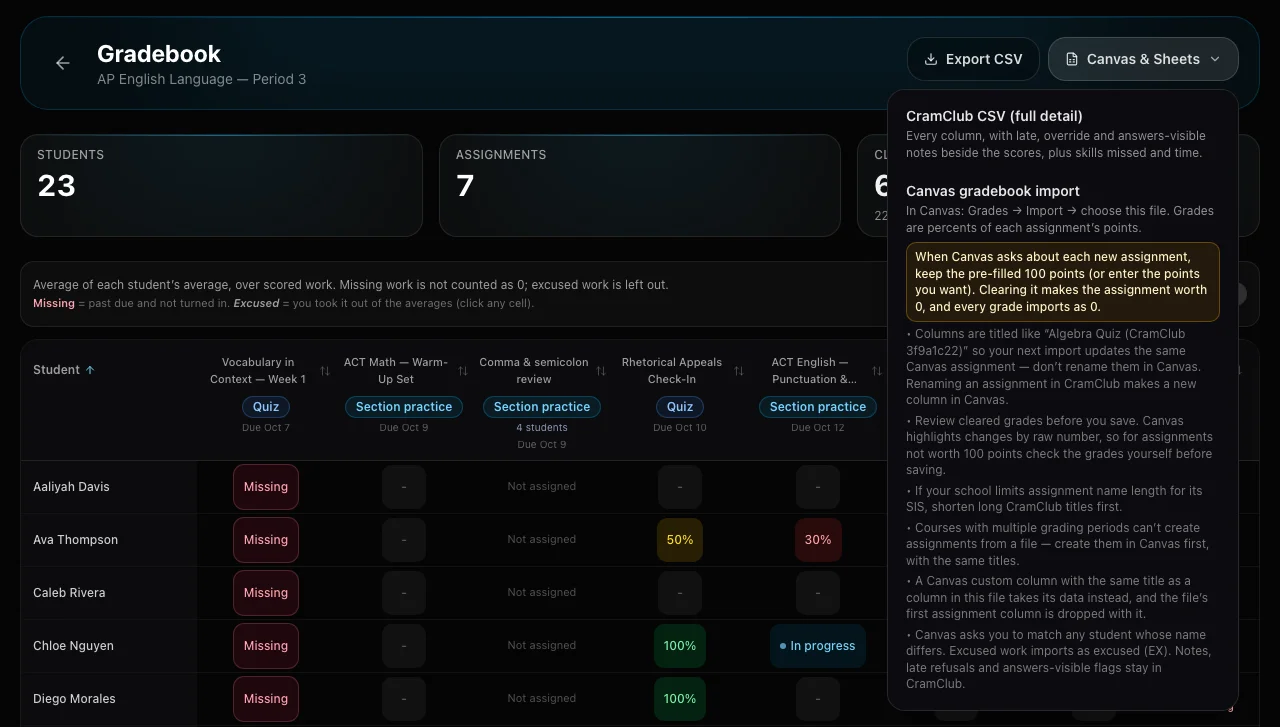
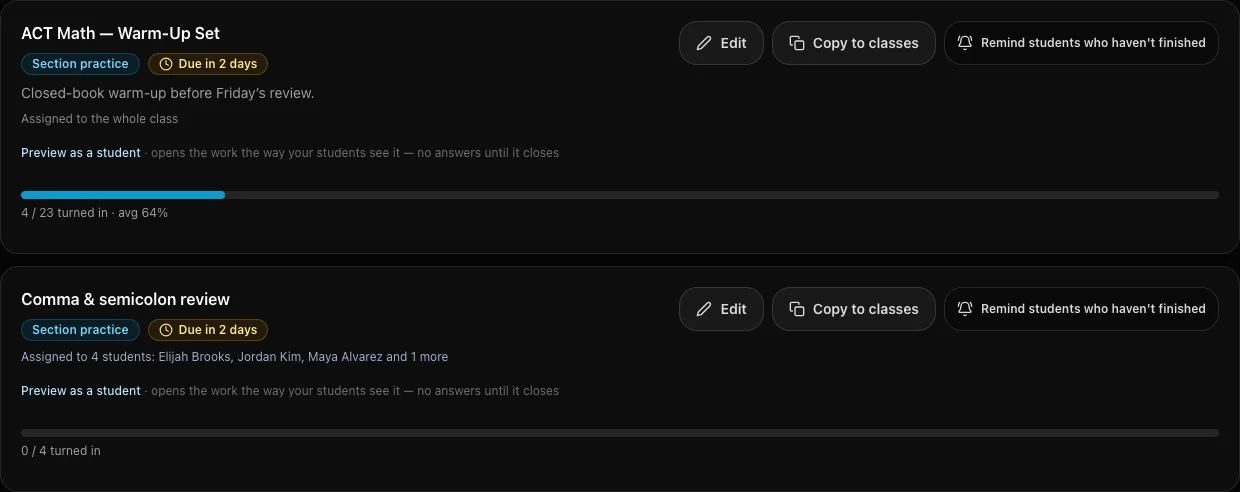
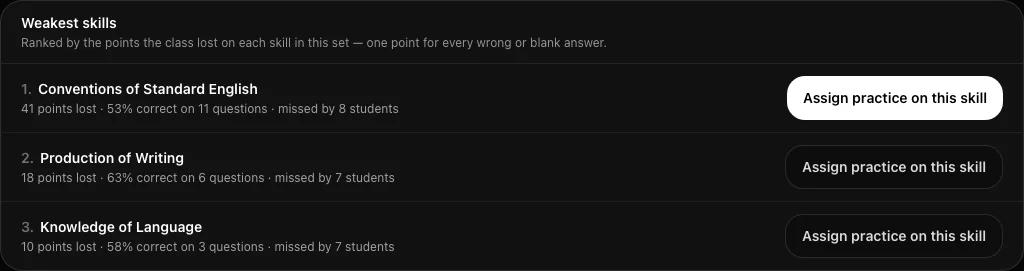
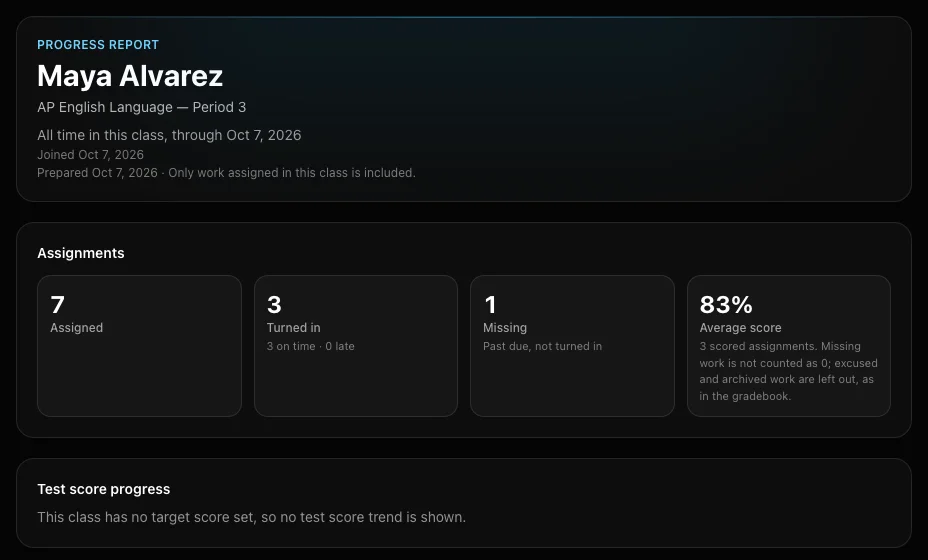
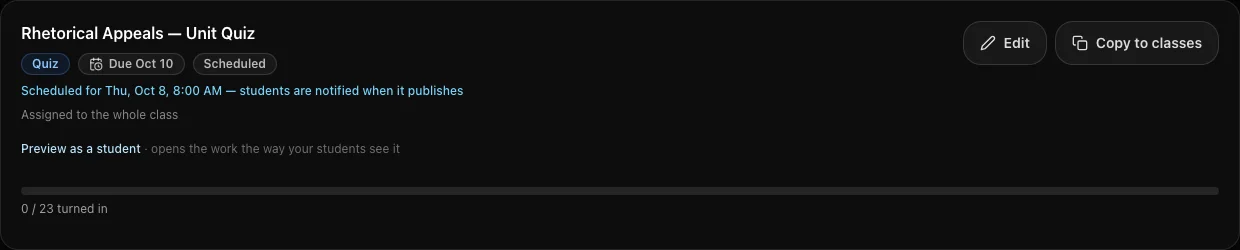
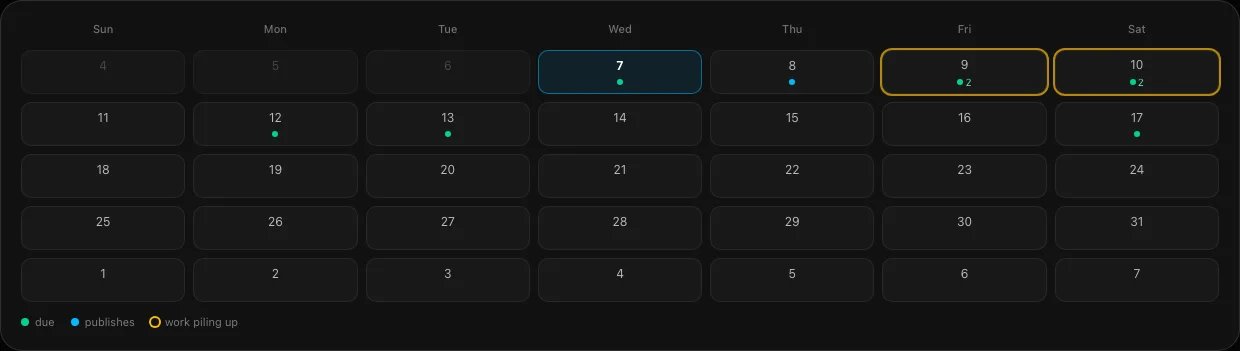
Screenshots from the product, taken with a sample class. Every student name in them is made up.
What Your Students Get
Everything your students need to prepare for SAT, ACT, PSAT, and GRE — without adding to your workload.
Full-Length Practice Tests
Any full-length practice test you assign is free for every student — one sitting each, on any of the 42 editions, without using their monthly allowance. On their own, a free account gets 2 full-length practice attempts a month, across the 11 editions the free plan opens (2 SAT, 1 ACT, 7 PSAT and 1 GRE). A paid seat opens all 42 SAT, ACT, PSAT and GRE editions with no monthly cap.
AI Tutor for Every Student
Professor Cramster gives students personalized, step-by-step explanations on the questions they miss — like having a tutor for each student.
A Predicted Score From Day One
Every diagnostic gives the student a predicted score and the skills to practice next, so they start working on what moves their score.
Standards-Aligned Content
Every SAT, ACT, PSAT, and GRE question is aligned to the official test specs and content frameworks.
Instant, Explained Feedback
In practice mode, every question is graded the moment a student answers, with an explanation of what went wrong. Closed-book work and timed tests hold the answers until the end.
Gamified Engagement
Streaks, XP, and study challenges keep students coming back without you having to nag.
What an Educator Told Us
Not a paid reviewer, and not edited by us — published with permission.
“Creating classes and inputting students was easily done. I have received FANTASTIC support from CramClub themselves. They made the system easier to use. I am excited about how this tool will help prepare my students for the ACT!”
How It Works
Get your classroom set up and your students practicing in three simple steps.
Create Your Classroom
Request classroom access with your school email. We verify by hand — usually within one business day — and email you the moment you are approved.
Invite Your Students
Share a class code or link. Students join and start practicing immediately.
Track Progress
See your whole class in one place — who has joined, who holds a seat, and, for assigned quizzes, diagnostics, section practice sets and full-length practice tests, who has finished, what is missing and how they scored. Each student has a printable progress report.
Built for How You Teach
Whether you teach a prep class, a PSAT/GRE cohort, run an after-school program, or tutor on your own — CramClub fits your workflow.
SAT/ACT Prep Class
Assign diagnostics, quizzes and full-length practice tests with due dates, and use class time for the concepts your students find hardest.
PSAT/GRE Prep
Replace generic homework with targeted PSAT or GRE practice. Students get instant feedback and adaptive study plans.
Test Prep Club or After-School Program
Give students self-paced practice with AI support. Perfect for clubs or after-school programs with limited instructor time.
Tutoring Center or Private Tutor
Run every tutor’s roster under one account, add tutors as co-teachers, and buy seats once for all of them.
See CramClub for tutors →Frequently Asked Questions
Everything you need to know about using CramClub in your classroom.
Is CramClub really free for teachers?+
How do I track my students’ progress?+
What tests and subjects are available?+
Do students need to create accounts?+
Can I give work to only some of my students?+
Can I get grades into Google Classroom or my school gradebook?+

Start Using CramClub in Your Classroom
Free for teachers. No credit card, no contracts. Request access with your school email and we’ll verify it by hand.
All practice questions are original, expert-written content designed to replicate the format, content domains, and difficulty of each official exam — not reproduced from any official source. SAT® and AP® are registered trademarks of the College Board. PSAT/NMSQT® is a registered trademark of the College Board and National Merit Scholarship Corporation. ACT® is a registered trademark of ACT, Inc. GRE® is a registered trademark of Educational Testing Service (ETS). None of these organizations are affiliated with, or endorse, CramClub.